Wave
Sine displacement — the procedural warp that needs no asset. Pixels are resampled at a position offset by a sine of their own coordinate, so the content ripples without anything being generated or loaded. For an arbitrary warp driven by an image, see displace.
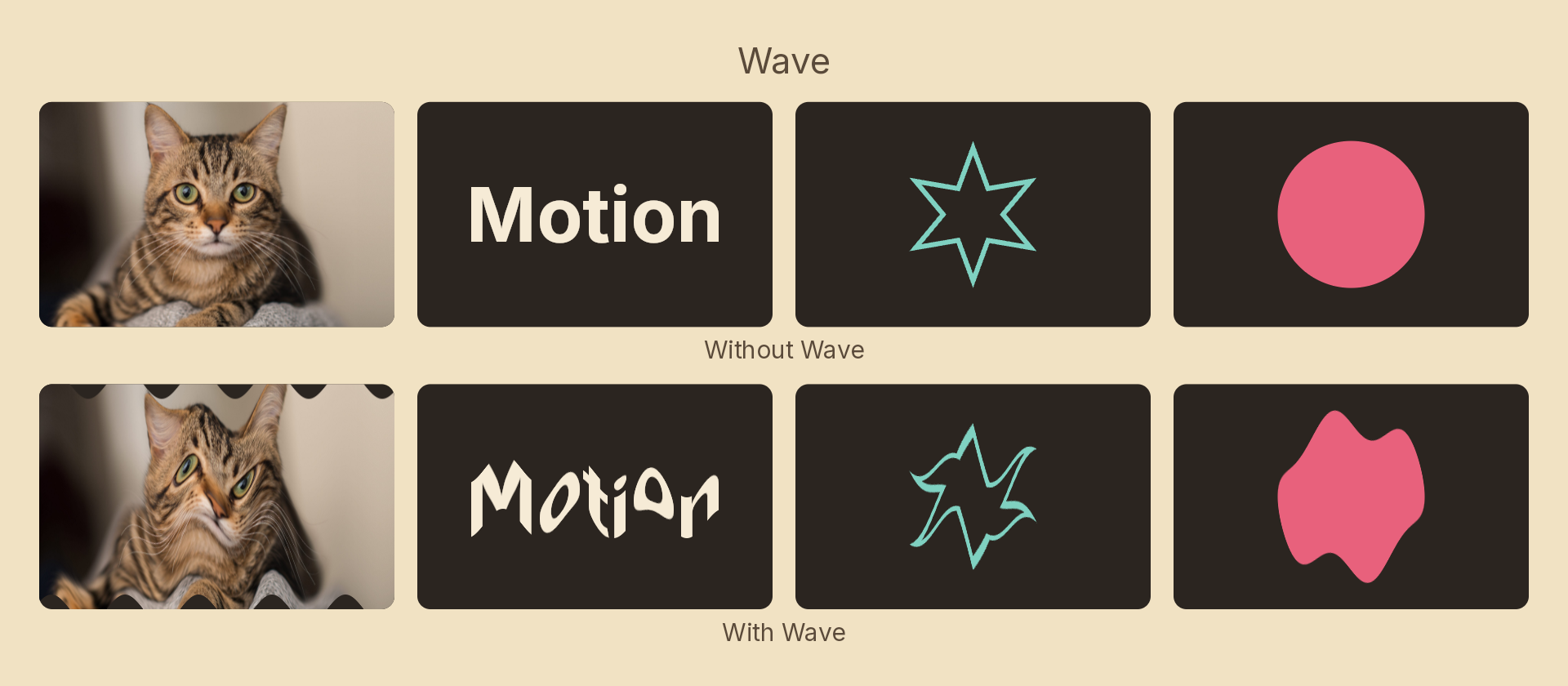
Usage
import { Effects } from 'motion-script';

// A horizontal ripple travelling across the content
<Text text="WOBBLE" effects={Effects.wave(20)} />

// Explicit per-axis amplitude
<Rect effects={Effects.wave({ amplitude: { x: 12, y: 0 }, wavelength: 80 })} />

// Concentric rings from a point — the pond-ripple look
<Image src="pool.jpg" effects={Effects.wave({ amplitude: 16, shape: 'radial', center: { x: 0.3, y: 0.6 } })} />
A bare number sets the Y amplitude, not both axes. A wave that displaces along its own direction of travel just smears; the transverse case is the one worth a terse spelling.
Props
| Prop | Type | Default | Description |
|---|---|---|---|
type | 'wave' | – | Effect identifier |
amplitude | number | { x, y } | 20 | Peak displacement in px. A number sets the Y axis only |
wavelength | number | 120 | Distance between crests in px |
phase | number | 0 | Phase offset in degrees |
shape | 'linear' | 'radial' | 'linear' | Parallel crests, or concentric rings |
angle | number | 0 | Direction the crests advance along, in degrees. 'linear' only |
center | { x: number; y: number } | { x: 0.5, y: 0.5 } | Ring origin in 0–1 layer coordinates. 'radial' only |
mode | 'foreground' | 'backdrop' | 'foreground' | Ripple the node's own content, or the backdrop beneath it |
Animating
phase is the one to animate. It is in degrees and the sine wraps, so a linear tween over 360 loops seamlessly — that is how you make the wave travel. A static wave reads as a distortion rather than as motion.
import { createScene, Text, Effects, linear, loop } from 'motion-script';

export default createScene(function* (stage) {
  const title = stage.add(<Text text="FLAG" fontSize={200} fill="white" />);

  // One full cycle per second, seamlessly repeating.
  yield* loop(4, function* () {
    title.set({ effects: Effects.wave({ amplitude: 24, wavelength: 140, phase: 0 }) });
    yield* title.to({
      effects: Effects.wave({ amplitude: 24, wavelength: 140, phase: 360 }),
    }, 1, linear);
  });
});
Ramp it on by tweening amplitude from 0.
Stacking with other effects
// Heat haze: a fine, fast ripple plus a touch of blur
<Rect effects={Effects.wave({ amplitude: 4, wavelength: 40 }).blur(2)} />