Block Displace
Cuts the content into bands and slides each one by a random amount — datamosh-style tearing.
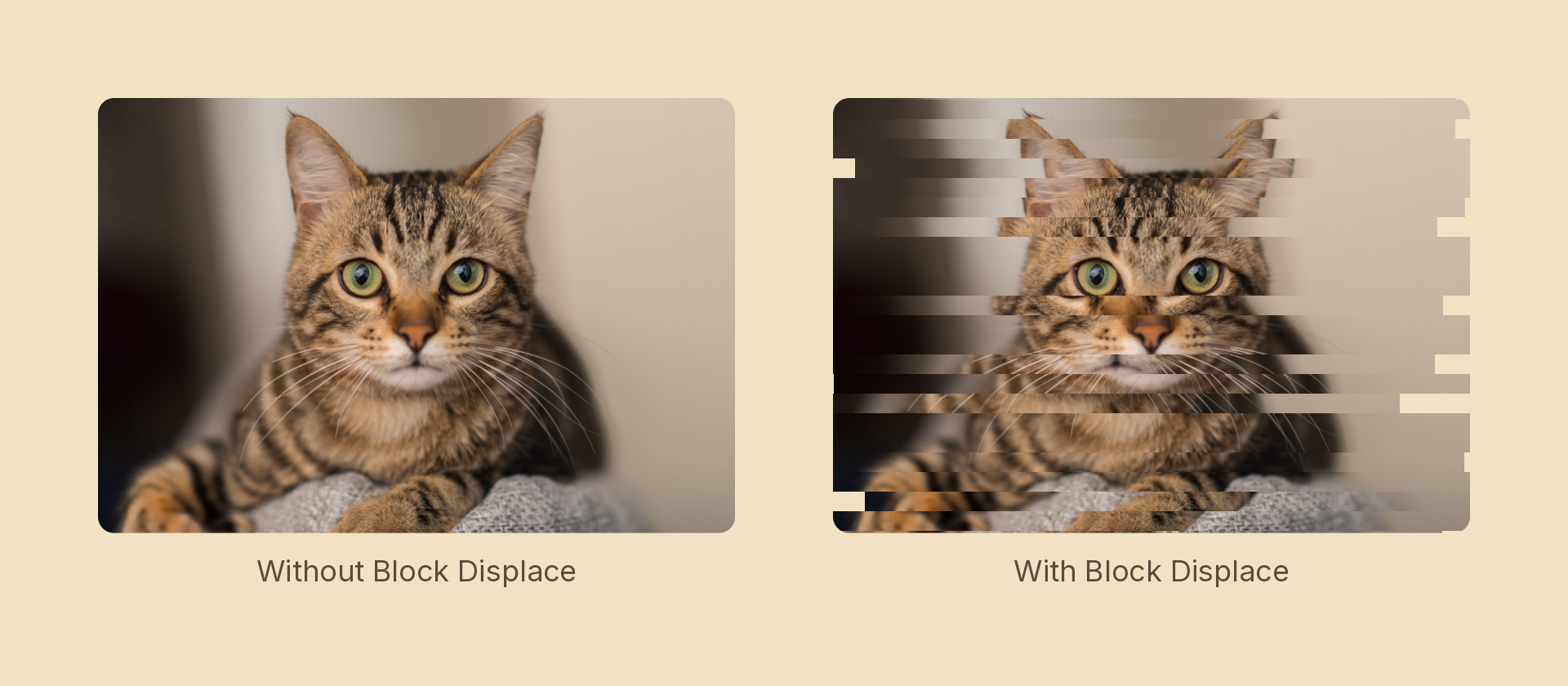
Usage
import { Effects } from 'motion-script';

// Default: sparse horizontal tears
<Image src={'./photo.jpg'} effects={Effects.blockDisplace()} />

// Scalar shorthand sets the maximum displacement
<Image src={'./photo.jpg'} effects={Effects.blockDisplace(60)} />

// Every band moves, in thin slices
<Image src={'./photo.jpg'} effects={Effects.blockDisplace({ amount: 40, size: 6, density: 1 })} />

// Vertical tearing
<Image src={'./photo.jpg'} effects={Effects.blockDisplace({ amount: 30, axis: 'y' })} />
Props
| Prop | Type | Default | Description |
|---|---|---|---|
type | 'blockDisplace' | – | Effect identifier |
amount | number | 20 | Maximum displacement in pixels. 0 is off |
size | number | 16 | Band thickness in pixels |
density | number | 0.3 | 0–1 fraction of bands that move at all |
seed | number | 0 | Field offset — step it to jump between glitch states |
axis | EffectAxis | 'x' | Which way bands slide. 'x' tears horizontal rows |
mode | 'foreground' | 'backdrop' | 'foreground' | 'backdrop' tears the content beneath the node |
density is what separates this from noise: only that fraction of bands move at all, so the image stays readable and the tear reads as a fault. At 1 every band shifts and the result turns to static.
Animating: step the seed, don't slide it
The displacement is a pure function of the band index and seed, so a frame always re-renders identically. That makes seed the right handle for motion — but step it in whole numbers. A smooth tween slides every band continuously, which reads as a wobble; discrete jumps read as digital:
import { createScene, createRef, Image, Effects, wait } from 'motion-script';

const tear = (seed: number) => Effects.blockDisplace({ amount: 50, size: 20, density: 0.5, seed });

export default createScene(function* (stage) {
  const photo = createRef<Image>();
  stage.add(<Image ref={photo} src={'./photo.jpg'} effects={tear(0)} />);

  // Four distinct glitch states, an eighth of a second apart.
  for (let i = 1; i <= 4; i++) {
    photo().set({ effects: tear(i) });
    yield* wait(0.125);
  }
  photo().set({ effects: Effects.blockDisplace(0) });
});
Stacking with other effects
// Broken signal: tear first, so the displaced bands carry their own fringe
<Image src={'./photo.jpg'} effects={Effects.blockDisplace(40).rgbShift(6).scanlines(0.5)} />
Order matters here more than most: rgbShift after blockDisplace fringes the torn bands, while the reverse paints an intact fringe over an already-broken image.