Grain
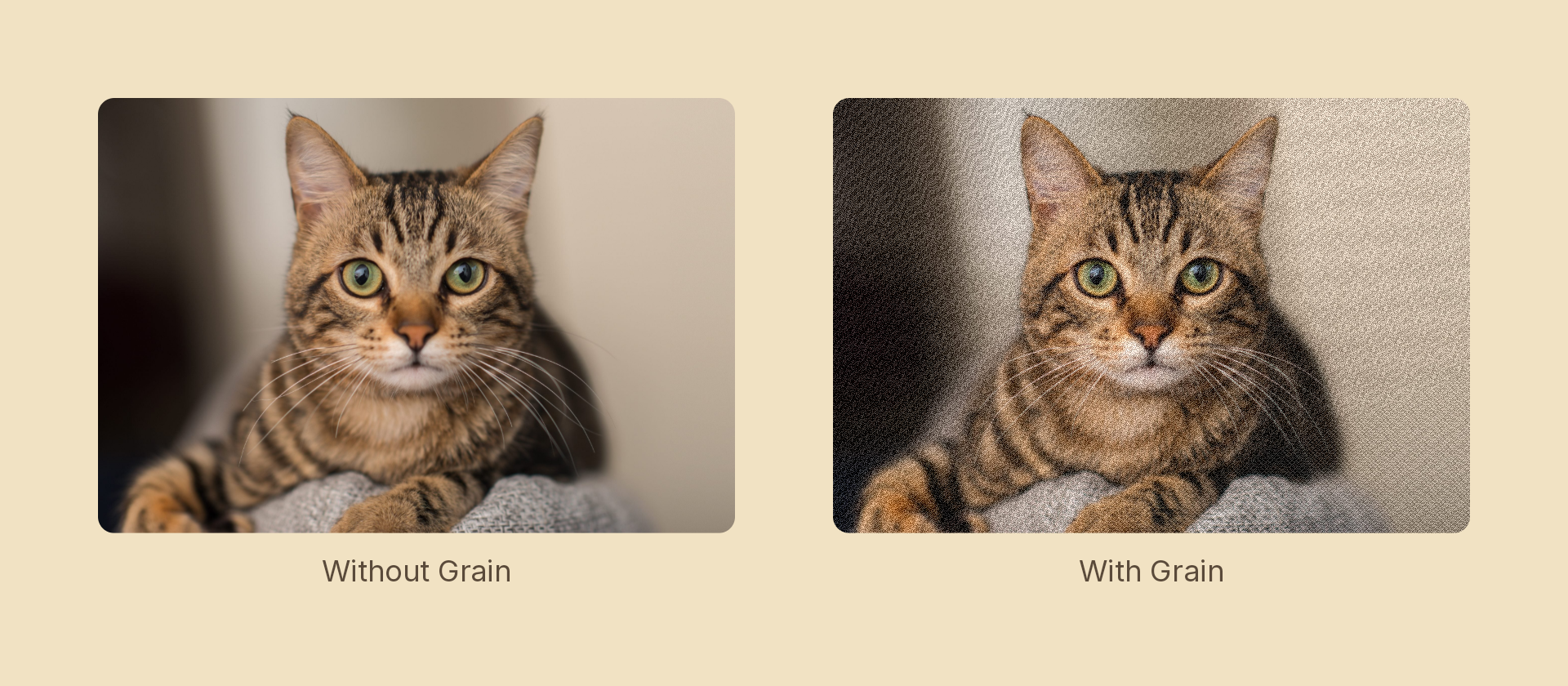
Adds signed per-pixel noise — film grain. The noise lightens as often as it darkens, so average exposure is unchanged, and it is confined to the node's own silhouette.
Usage
import { Effects } from 'motion-script';

// Default: subtle static luminance noise
<Image src={'./photo.jpg'} effects={Effects.grain()} />

// Scalar shorthand sets the amount
<Image src={'./photo.jpg'} effects={Effects.grain(0.4)} />

// Real film grain: re-seeded every frame
<Image src={'./photo.jpg'} effects={Effects.grain({ amount: 0.35, animated: true })} />

// Chunky colour speckle
<Image src={'./photo.jpg'} effects={Effects.grain({ amount: 0.5, size: 3, colored: true })} />
Props
| Prop | Type | Default | Description |
|---|---|---|---|
type | 'grain' | – | Effect identifier |
amount | number | 0.25 | 0–1 noise amplitude. 0 is off |
size | number | 1 | Grain cell size in pixels. 1 is per-pixel, higher is chunkier |
seed | number | 0 | Field offset. Animate it for frame-locked shimmer |
animated | boolean | false | Re-seed each frame from the node's elapsed time |
colored | boolean | false | Per-channel speckle instead of one luminance value |
mode | 'foreground' | 'backdrop' | 'foreground' | 'backdrop' grains the content beneath the node |
Static vs. animated
Grain that doesn't move reads as a texture, not as film — so reach for animated: true whenever the shot is moving.
Leave it off when the render has to be deterministic (a pixel-diff test, or a frame you may re-render). With animated off, the field is a pure function of the pixel and seed, so the same frame always produces the same grain. You can still get movement by tweening seed, which stays locked to the timeline rather than to wall-clock time:
import { createScene, createRef, Image, Effects, linear } from 'motion-script';

export default createScene(function* (stage) {
  const photo = createRef<Image>();
  stage.add(<Image ref={photo} src={'./photo.jpg'} effects={Effects.grain({ amount: 0.3, seed: 0 })} />);

  // 60 distinct fields over 2s — deterministic, but it crawls.
  yield* photo().to({ effects: Effects.grain({ amount: 0.3, seed: 60 }) }, 2, linear);
});
Stacking with other effects
// 16mm: desaturate a touch, grain, then vignette
<Image src={'./photo.jpg'} effects={Effects.grayscale(0.3).grain({ amount: 0.3, animated: true }).vignette(0.6)} />