Oil Paint
A Kuwahara filter: averages within a region but never across an edge, so flat areas smooth into brushstrokes while boundaries stay crisp.
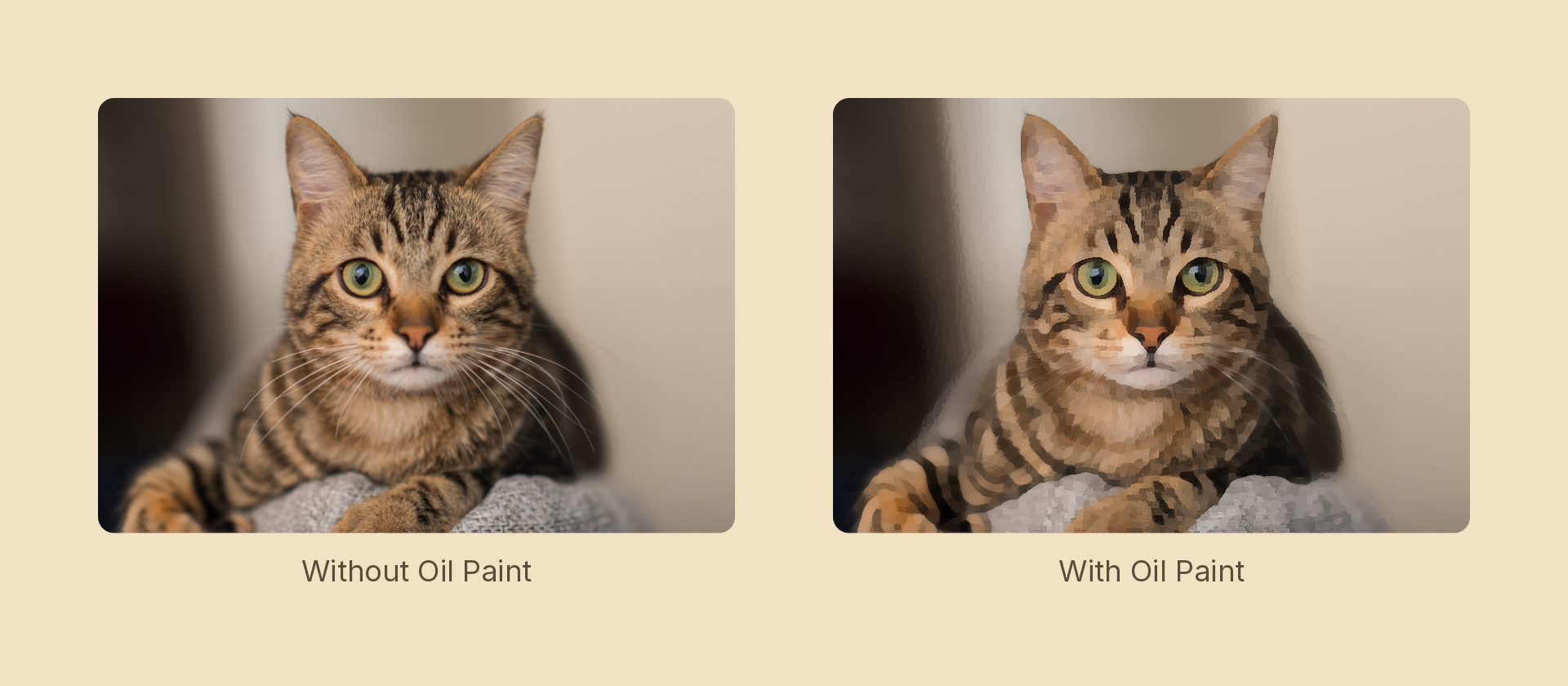
Usage
import { Effects } from 'motion-script';

// Default: a 3px brush
<Image src={'./photo.jpg'} effects={Effects.oilPaint()} />

// Scalar shorthand sets the radius
<Image src={'./photo.jpg'} effects={Effects.oilPaint(5)} />
Props
| Prop | Type | Default | Description |
|---|---|---|---|
type | 'oilPaint' | – | Effect identifier |
radius | number | 3 | Window radius in pixels — brush size. Capped at 6 |
mode | 'foreground' | 'backdrop' | 'foreground' | 'backdrop' paints the content beneath the node |
Cost
This is by a wide margin the most expensive effect in the set. Each pixel examines four overlapping quadrant windows of (radius + 1)² samples, so cost grows with the square of the radius: radius 3 is ~64 texture reads per pixel, radius 6 is ~196. The radius is hard-capped at 6 for that reason.
If you need a bigger brush, prefer scaling the node down, applying the effect, and scaling back up — the cost follows the pixels, not the apparent size.
How it works
Four windows share the centre pixel and extend into each quadrant. For each, the shader accumulates a mean and a variance; the output is the mean of whichever window varied least.
That choice is the whole effect. The flattest window is always the one that doesn't straddle a boundary, so colour never bleeds across an edge — which is exactly what a blur does and why a blur looks like a blur. Variance is measured on luminance (one scalar to compare, and it matches what "flat" means to the eye) while colour comes from that window's own mean, so hue is preserved.
Animating
import { createScene, createRef, Image, Effects, easeInOut } from 'motion-script';

export default createScene(function* (stage) {
  const photo = createRef<Image>();
  stage.add(<Image ref={photo} src={'./photo.jpg'} effects={Effects.oilPaint(0)} />);

  yield* photo().to({ effects: Effects.oilPaint(4) }, 1.2, easeInOut('quad'));
});
Radius 0 is a true no-op — every window collapses to the centre pixel — so the effect fades on cleanly.
Stacking with other effects
// Painted, then framed
<Image src={'./photo.jpg'} effects={Effects.oilPaint(4).texture({ src: './canvas.jpg' }).vignette(0.4)} />