Progressive blur
Blur whose radius ramps across the node instead of being uniform. A plain blur is a constant; this interpolates from sharp to radius between start and end along the ramp, which is what makes content appear to dissolve into softness rather than simply being out of focus.
In mode: 'backdrop' it is the frosted panel with a falloff — the translucent bar whose blur fades out at its edge instead of stopping at a hard line. That is the case background blur cannot express, and the reason this effect exists.
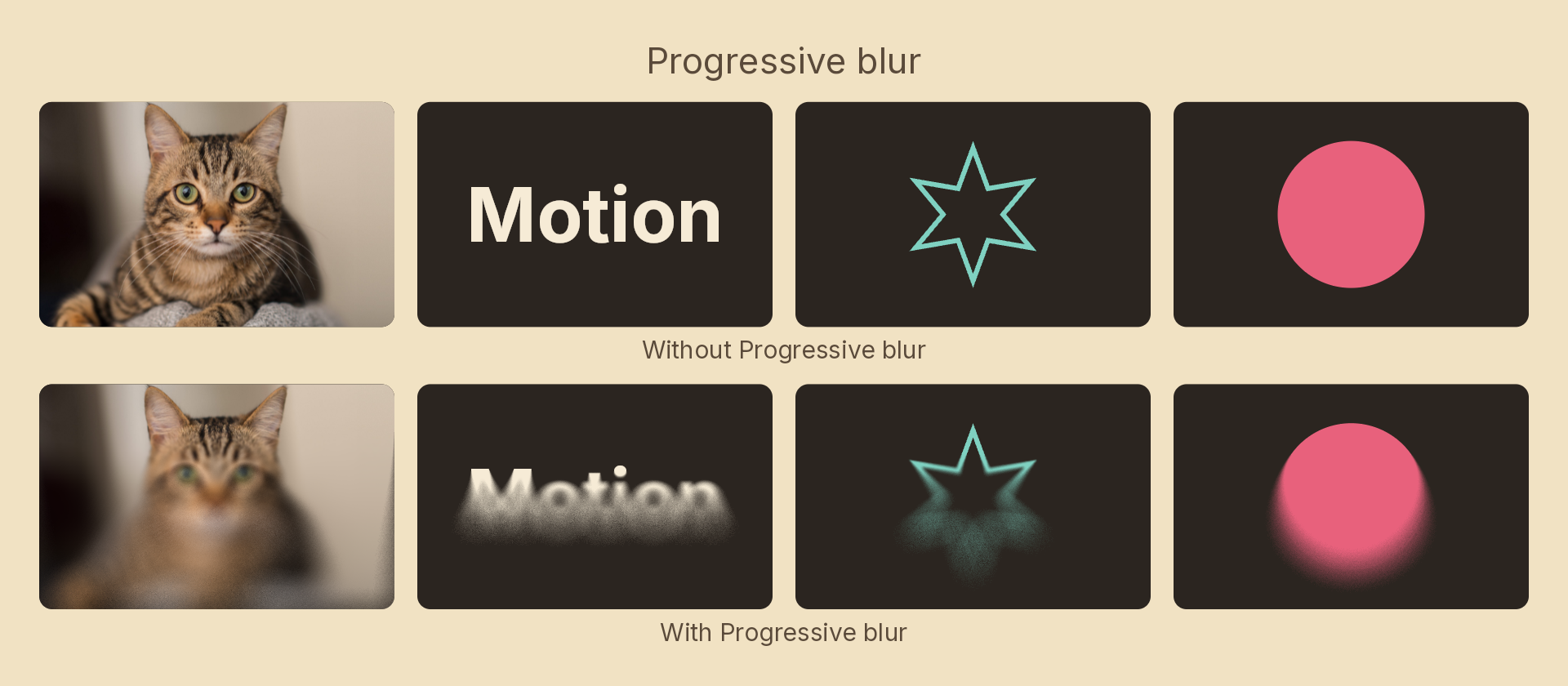
Usage
import { Effects } from 'motion-script';

// Sharp at the top, dissolving downward
<Image src="hero.jpg" effects={Effects.progressiveBlur({ radius: 32, angle: 90 })} />

// Sharp centre, soft surround — a cheap depth-of-field
<Image src="portrait.jpg" effects={Effects.progressiveBlur({ radius: 24, shape: 'radial', start: 0.3 })} />

// A frosted bar whose blur fades out at its bottom edge
<Rect fill="white/10" effects={Effects.progressiveBlur({ radius: 40, angle: 90, end: 0.8, mode: 'backdrop' })} />
Props
| Prop | Type | Default | Description |
|---|---|---|---|
type | 'progressiveBlur' | – | Effect identifier |
radius | number | 24 | Blur spread in px at the far end of the ramp. 0 = off |
shape | 'linear' | 'radial' | 'linear' | How the ramp is laid out |
start | number | 0 | 0–1 position along the ramp where the blur starts building |
end | number | 1 | 0–1 position where it reaches radius |
angle | number | 90 | Ramp direction in degrees; 0 = left-to-right. 'linear' only |
center | { x: number; y: number } | { x: 0.5, y: 0.5 } | Ramp origin in 0–1 layer coordinates. 'radial' only |
samples | number | 20 | Taps averaged at full radius, 2–32. Higher is smoother and slower |
mode | 'foreground' | 'backdrop' | 'foreground' | Blur the node's own content, or the backdrop beneath it |
Ramp shapes
'linear'— the ramp runs alongangle, so the blur builds from one edge toward the other. The gradient strip under a toolbar, or over the bottom of a hero image.'radial'— the ramp runs outward fromcenter, so the middle stays sharp and the surround softens.
Cost
Cost scales with samples, and they are spent on the widest part of the ramp — pixels below start return the source untouched without sampling at all. The taps sit on a golden-angle spiral rotated by a per-pixel hashed angle, which trades the structured ghosting a low tap count would otherwise produce for fine noise the eye accepts as blur. If a large radius still looks grainy, raise samples.
samples snaps rather than interpolating in a tween, because the tap count is baked into the compiled shader — tweening it would compile a new program every frame.
Animating
import { createScene, Image, Effects, easeOut } from 'motion-script';

export default createScene(function* (stage) {
  const hero = stage.add(<Image src="hero.jpg" width="fill" height="fill" />);

  hero.set({ effects: Effects.progressiveBlur(0) });
  yield* hero.to({
    effects: Effects.progressiveBlur({ radius: 40, angle: 90, start: 0.2 }),
  }, 1, easeOut('quad'));
});
Sliding start and end together moves the focal band across the node without changing how soft it gets.
See also
- Blur — uniform Gaussian blur
- Background blur — uniform blur of the backdrop