Kaleidoscope
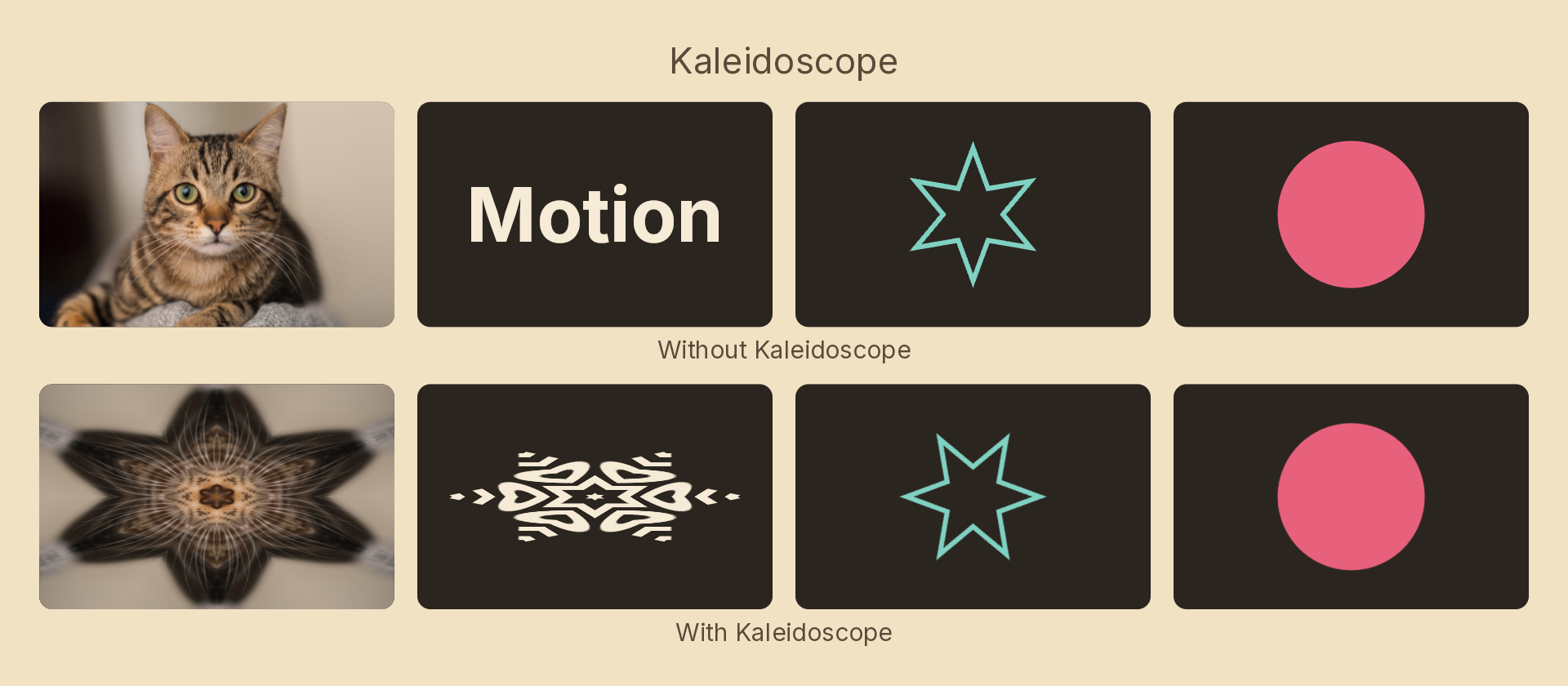
Folds the content into segments mirrored wedges around a point, so one slice of the source is repeated around a circle.
Only the wedge starting at angle is ever read; every other segment is that same wedge reflected or rotated into place. That is why rotating angle animates so well — the pattern stays locked while different source material sweeps through the wedge, which is not what rotating the node does.
Usage
import { Effects } from 'motion-script';

// The familiar six-fold snowflake
<Image src="photo.jpg" effects={Effects.kaleidoscope(6)} />

// Off-centre, rotated, sampling further out
<Image src="photo.jpg" effects={Effects.kaleidoscope({ segments: 8, angle: 30, offset: 0.2 })} />
Props
| Prop | Type | Default | Description |
|---|---|---|---|
type | 'kaleidoscope' | – | Effect identifier |
segments | number | 6 | Number of mirrored wedges around the circle. Below 2 is a no-op |
angle | number | 0 | Rotation of the wedge pattern in degrees |
center | { x: number; y: number } | { x: 0.5, y: 0.5 } | Fold origin in 0–1 layer coordinates |
offset | number | 0 | Radial offset of the sampled wedge, as a fraction of the half-extent |
amount | number | 1 | 0–1 blend from the original content to the fully folded pattern |
mode | 'foreground' | 'backdrop' | 'foreground' | Fold the node's own content, or the backdrop beneath it |
Mirroring rather than merely repeating is what makes the seams continuous — a plain repeat leaves a hard edge at every wedge boundary, because the two sides sample opposite ends of the slice.
Animating
segments is discrete and snaps at the midpoint of a tween: a fractional wedge cannot tile the circle, so it would tear at the seam. Use amount to ramp the effect on, and angle to animate it once it is on.
import { createScene, Image, Effects, easeOut, linear } from 'motion-script';

export default createScene(function* (stage) {
  const photo = stage.add(<Image src="photo.jpg" width="fill" height="fill" />);

  // Fold it in…
  photo.set({ effects: Effects.kaleidoscope({ segments: 6, amount: 0 }) });
  yield* photo.to({ effects: Effects.kaleidoscope({ segments: 6, amount: 1 }) }, 0.8, easeOut('quad'));

  // …then sweep the source through the wedge.
  yield* photo.to({ effects: Effects.kaleidoscope({ segments: 6, amount: 1, angle: 360 }) }, 6, linear);
});
offset pulls different source material into the pattern without moving the node, so tweening it and angle together gives a much richer sweep than either alone.
See also
- Twirl — rotates about a point instead of mirroring about it