Twirl
Rotates the content about a point by an amount that falls off with distance, so the middle spins and the rim stays put.
The falloff is what separates this from rotating the node: rotation is rigid, this shears. Everything inside radius twists by a fraction of angle that reaches full strength at the centre and zero at the rim, which is what makes it read as a vortex rather than a transform.
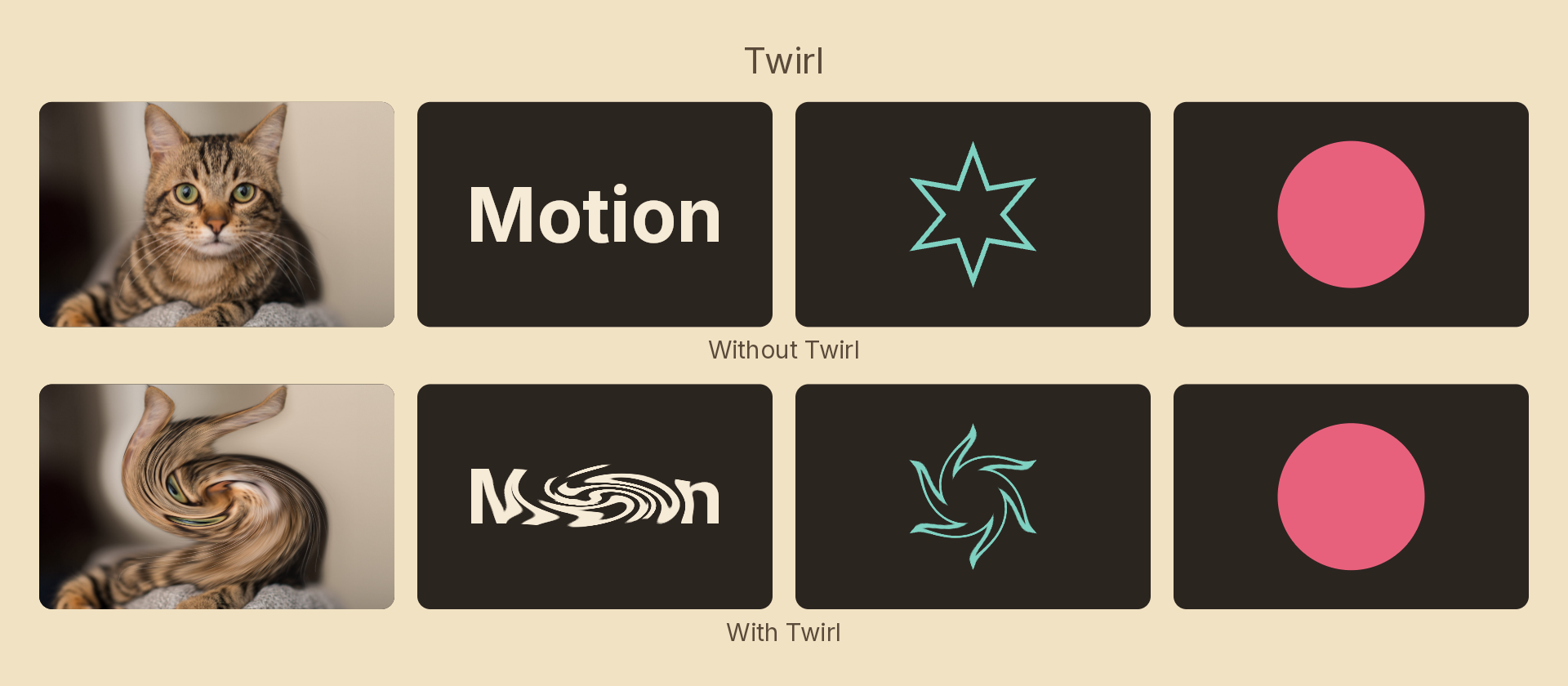
Usage
import { Effects } from 'motion-script';

// A half-turn vortex over the whole node
<Image src="photo.jpg" effects={Effects.twirl(180)} />

// Tighter, off-centre, twisting the other way
<Rect effects={Effects.twirl({ angle: -300, radius: 0.5, center: { x: 0.25, y: 0.5 } })} />
Props
| Prop | Type | Default | Description |
|---|---|---|---|
type | 'twirl' | – | Effect identifier |
angle | number | 180 | Rotation at the centre in degrees. Negative twirls the other way. 0 = off |
radius | number | 1 | 0–1 radius of influence, as a fraction of the node's half-extent |
center | { x: number; y: number } | { x: 0.5, y: 0.5 } | Vortex centre in 0–1 layer coordinates |
mode | 'foreground' | 'backdrop' | 'foreground' | Twirl the node's own content, or the backdrop beneath it |
Coordinates are normalised by the node's half-extent before rotating, so the vortex is round on a non-square node rather than stretched into an ellipse by the aspect ratio.
Animating
angle has no wrap point, so a long tween keeps winding into an ever-tightening spiral.
import { createScene, Image, Effects, easeInOut } from 'motion-script';

export default createScene(function* (stage) {
  const photo = stage.add(<Image src="photo.jpg" width={800} height={800} />);

  photo.set({ effects: Effects.twirl(0) });
  yield* photo.to({ effects: Effects.twirl({ angle: 540, radius: 0.9 }) }, 2, easeInOut('quad'));
});
A uniform area of colour has nothing to twist — a solid disc rotated about its own centre is itself. The effect reads on detail: photos, text, strokes, gradients.
Stacking with other effects
// Vortex dissolve: twist, then smear radially outward
<Image src="photo.jpg" effects={Effects.twirl(360).radialBlur({ amount: 0.4, style: 'spin' })} />
See also
- Wave — sine displacement
- Displace — arbitrary warp from an image map
- Radial blur — smears about a point rather than rotating about it