Posterize
Quantizes each color channel into a fixed number of discrete brightness bands, flattening gradients into flat-color steps. Mirrors After Effects' Posterize effect.
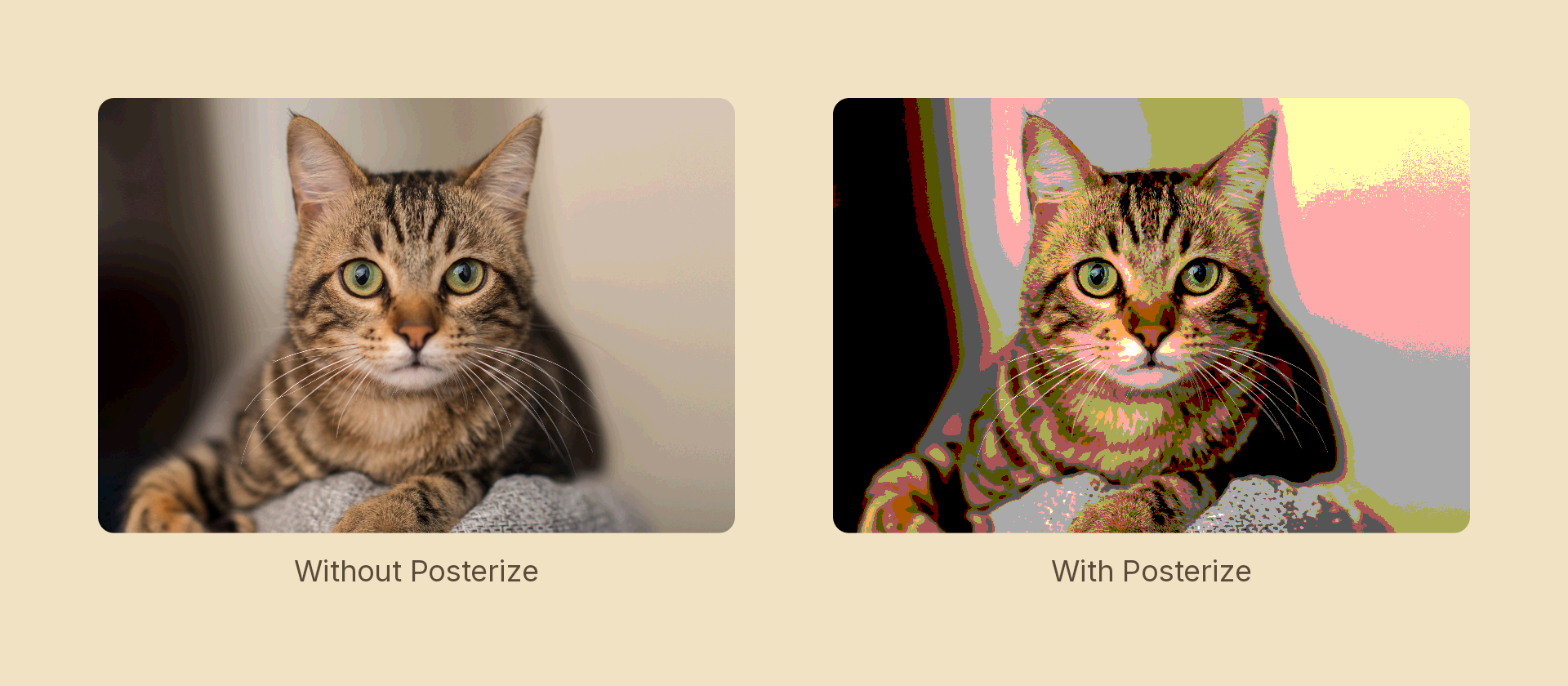
Usage
import { Effects } from '@motion-script/core';

// Default: 4 levels per channel
<Rect effects={Effects.posterize()} />

// Coarser posterize
<Rect effects={Effects.posterize(3)} />

// Raw object
<Rect effects={[{ type: 'posterize', levels: 4 }]} />
Props
| Prop | Type | Default | Description |
|---|---|---|---|
type | 'posterize' | – | Effect identifier |
levels | number | 4 | Number of brightness bands per channel (minimum 2). Lower = fewer steps, more graphic |
mode | 'foreground' | 'backdrop' | 'foreground' | 'backdrop' posterizes the content beneath the node, clipped to its silhouette, leaving the node's own content untouched |
Animating
Animate from many levels (near-photographic) down to few (graphic):
import { createScene, Rect, Effects, tween, lerpNumber, easeInOut } from '@motion-script/core';

export default createScene(function* (stage) {
  const img = new Rect({
    width: 600,
    height: 400,
    fill: { type: 'image', src: './photo.jpg', fit: 'fill' },
  });
  img.set({ effects: Effects.posterize(32) });
  stage.add(img);

  yield* tween(1.5, (t) => {
    img.set({ effects: Effects.posterize(lerpNumber(32, 3, easeInOut(t))) });
  });
});
Stacking with other effects
// Graphic pop-art look
<Rect effects={Effects.posterize(4).grayscale(0.3)} />